

Cart
0
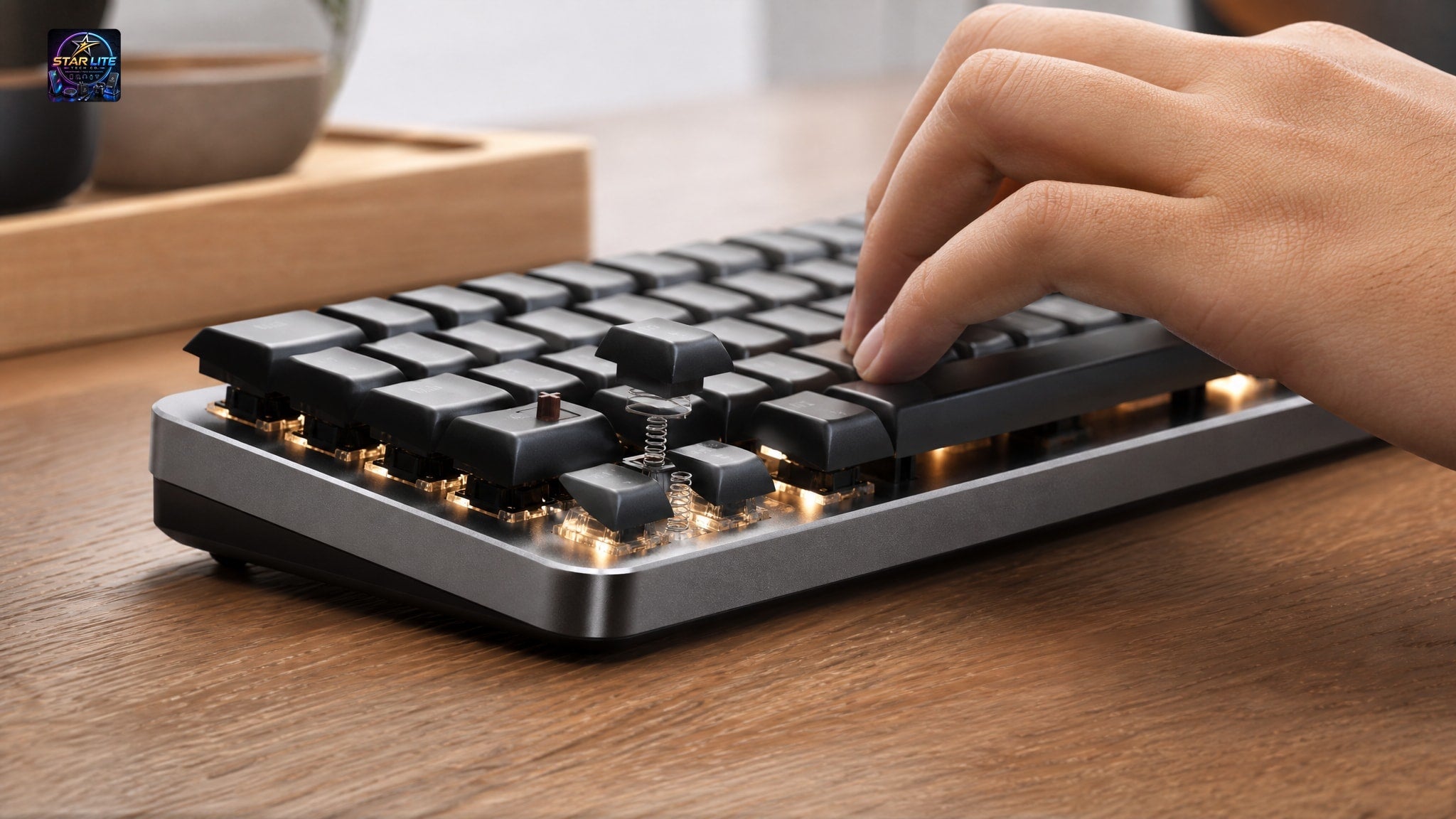
Upgrading your desk setup often starts with the keyboard, but the terminology gets confusing fast when you're trying to balance performance with a strict budget. You'll see "mechanical feel" and "mechanical" used interchangeably in product listings, yet they describe different hardware. That difference affects everything from typing rhythm to how long the thing lasts. Knowing it up front saves you from buyer's remorse, whether you're drafting reports, streaming, or climbing ranked ladders.
Key Takeaways
- Mechanical-feel keyboards use modified membrane domes to simulate tactile feedback, while true mechanical keyboards employ individual physical switches with metal springs for each key.
- True mechanical switches enable partial-press techniques and rapid double-taps that membrane-based mechanical-feel boards cannot support due to requiring full compression for circuit completion.
- Mechanical keyboards allow individual switch replacement and repair, whereas mechanical-feel membrane boards typically require full unit replacement when a single key fails.
- Budget mechanical-feel options around USD 22 provide full-size layouts and backlighting for casual users, while true mechanical models range from USD 58 to USD 195 for performance-focused buyers.
- Switch selection matters more than most specs: Red suits fast gaming, Green provides clicky typing feedback, and Brown offers tactile response without excessive noise.
Defining Mechanical Feel vs True Mechanical Switches
The real difference sits beneath the keycap, in whatever registers the keystroke. A true mechanical keyboard uses individual physical switches for each key, each with its own metal spring and contact point that works independently of its neighbors. A mechanical-feel keyboard uses a modified membrane dome sheet shaped to mimic that tactile bump, with no discrete switch underneath. The 104-Key Backlit Wired Gaming Keyboard With Mechanical Feel can copy the click and resistance curve of a mechanical board at a fraction of the cost, but it's still a membrane device at its core.
Think of this as a spectrum, not a good-versus-bad binary. The modified domes in mechanical-feel boards exist for a specific buyer: someone who wants the aesthetic and tactile upgrade without taking on switch maintenance. That makes mechanical-feel keyboards a reasonable step up from a standard office membrane, not a compromise. True mechanical models like the 87-Key Wired Mechanical Keyboard go further, offering Green, Red, or Brown switches so you can pick actuation force and sound, something membrane technology can't do.
Typing Experience and Tactile Feedback Comparison
Your typing rhythm depends on how consistent the actuation point is, and that's where true mechanical switches pull ahead. They give you a predictable travel distance and reset point, so your fingers learn exactly when a character will register. That means faster typing and less fatigue from bottoming out over a long session. Mechanical-feel keys work differently: a rubber dome has to fully compress to complete the circuit, which gives you a softer landing and resistance that shifts as the rubber ages or heats up.
The result is that a mechanical switch confirms a keystroke before the key even hits the plate, while a membrane board needs the full travel to register input. Gamers and typists who care about response time will notice mechanical switches allow quick double-taps and partial presses that a mushy membrane return stroke can't support. That said, the quieter, lighter action of some membrane boards suits a shared office where the sharp clack of mechanical switches would bother everyone else.
Mechanical feel doesn't replicate the nuanced feedback of genuine switches.
Durability and Long-Term Value Assessment
Longevity comes down to replaceable parts and material quality, not marketing claims, and this is where the two categories pull apart over years of use. True mechanical keyboards are modular: if one switch fails or sticks, you can desolder and swap just that component instead of tossing the whole board. Membrane-based mechanical-feel boards can't do this. The conductive traces and domes are printed onto a flexible plastic sheet, so one dead key usually means replacing the entire keyboard.
Weigh that against your own upgrade cycle. A mechanical-feel keyboard priced around USD 17 to USD 22 can be the better deal if you're planning to replace it within two years anyway, wear or no wear. The metal panels on premium mechanical models add rigidity, stop case flex and protect the PCB in transport, which is part of what you're paying for at the higher price. Mechanical-feel boards are water-resistant and sturdy enough for daily use, but they won't give you the decade of service a mechanical board with swappable parts can.
Budget Gaming Keyboard Options With Mechanical Feel
If you care more about looks and basic function than switch precision, mechanical-feel boards get you the visual language of gaming gear without the premium price. The 104-Key Backlit Wired Gaming Keyboard With Mechanical Feel is a full-size layout with a number pad and mixed-color backlighting, priced around USD 21.79 to USD 22.63, a good fit for students or casual players building their first setup. It handles spreadsheets by day and games by night, with multimedia shortcuts and an ergonomic layout for general computing that still looks the part on stream.
Star Lite Tech Co. sells both mechanical-feel and true mechanical 104-key backlit wired keyboards, so you can compare price to feature inside one catalog instead of guessing across brands. The 104-Key Backlit Wired USB Keyboard drops the "mechanical feel" branding and focuses on utility: water-resistant, plug-and-play, around USD 16.80 to USD 17.54. Neither board will win a tournament, but both give you reliable input and backlighting if discrete switches are out of budget.
These budget options handle general use well but lack the actuation consistency competitive play demands.
True Mechanical Keyboards for Performance and Customization
Once lowest price stops being the priority, true mechanical keyboards open up features that change how you interact with the machine. The 104-Key RGB Wired Mechanical Gaming Keyboard pairs programmable macros with a metal top panel and genuine mechanical switches, priced around USD 58.02 to USD 73.70 depending on the variant. Macros let you bind whole command sequences to a single key, which is a real edge in MMOs and productivity software that membrane firmware can't match.
If desk space matters more than a number pad, the 87-Key Wired Mechanical Keyboard drops the tenkeyless side and gives you a choice of Green, Red, or Brown switches instead, priced around USD 194.99. Green switches are the classic clicky feel. Red switches are smooth and linear, which FPS players tend to prefer. Brown switches split the difference: tactile, without the noise, for mixed work-and-gaming setups. That range of choice is what justifies the step up in price for anyone who treats the keyboard as a tool worth tuning rather than a disposable accessory.
Matching Switch Type to Your Primary Use Case
Picking the right switch color matters more than almost any other spec, because it sets the sound and feel of every keystroke you'll type for years. Red suits fast gaming, since light, quiet actuation holds up over marathon sessions. Green suits typists who want an audible click confirming every keystroke. Brown sits in between: tactile feedback for accuracy, without enough noise to start a fight in a shared apartment.
Stylish Alternatives: Retro Punk Designs Across Both Categories
Looks drive a lot of purchases in this category, and plenty of buyers care more about matching their desk than benchmarking actuation force. The Retro Punk Backlit Wired Gaming Keyboard (Black) leans into that, with round keycaps and industrial styling that stand out from the usual black rectangle. It's priced around USD 45.83, built for plug-and-play simplicity, and proof you don't need to give up personality to stay on budget.
For a similar look at a lower price, the Retro Punk Backlit Wired USB Gaming Keyboard comes in eight style variants from around USD 33.03 to USD 40.47, keeping the retro look while landing at a different price point. These boards are a reminder that the mechanical-feel-versus-mechanical debate sometimes misses the point: plenty of buyers choose on how the thing looks on the desk, not on actuation force. Just check whether a specific retro model is membrane or mechanical before you assume anything about how it performs, since the same look comes in both.
Choosing the Right Keyboard for Your Setup and Budget
The right pick comes from being honest about your use case, your upgrade timeline, and how much maintenance you're willing to deal with, not from chasing the highest spec on the page. Students and remote workers who type all day but rarely game competitively will likely get more value out of a mechanical-feel board paired with budget-friendly webcam options than from stretching for mechanical switches they'll never fully use. Competitive gamers and enthusiasts who want precise actuation and long-term repairability should buy mechanical from the start, since the higher upfront cost pays off over years of use and component-level upgrades.
Mechanical-feel keyboards are a reasonable choice if you want better looks and tactile feedback without taking on the cost and upkeep of discrete switches. True mechanical keyboards are for people with specific performance needs, or who enjoy maintaining and customizing their gear as part of the hobby. Star Lite Tech Co. stocks both tiers because neither one is universally better. The right keyboard is the one that fits how you actually work, play, and budget.
Frequently Asked Questions
What exactly is a mechanical feel keyboard?
A mechanical feel keyboard is a membrane keyboard with modified rubber domes designed to mimic the tactile bump and audible click of true mechanical switches. It uses the same underlying circuit technology as standard office keyboards but adds textured feedback to approximate the mechanical typing experience at a lower price point.
Why do mechanical keyboards feel better than membrane ones?
Mechanical keyboards feel better because each key has an independent switch with a consistent actuation point that registers before bottoming out, allowing your fingers to develop precise muscle memory. Membrane keyboards require full key travel to complete a circuit, creating a mushy sensation and variable resistance that increases finger fatigue during extended typing sessions.
Do competitive gamers prefer membrane or mechanical keyboards?
Competitive gamers overwhelmingly prefer mechanical keyboards because discrete switches enable faster actuation, consistent reset points, and techniques like rapid double-tapping that membrane boards cannot reliably execute. Mechanical-feel keyboards work fine for casual gaming, but the imprecise actuation and slower response of membrane domes put players at a disadvantage in ranked or tournament play.
Are mechanical feel keyboards worth buying in 2026?
Mechanical feel keyboards are worth buying if you want improved aesthetics and tactile feedback over basic office keyboards without investing in mechanical switch maintenance or paying premium prices. They serve as excellent transitional devices for students, remote workers, and casual gamers who prioritize budget and convenience over competitive performance specifications.

